A wrong or missing Date of Exit doesn't stay a data problem for long. It becomes a support ticket, then a rejected claim, then a former employee calling HR to ask why they can't access their own Provident Fund. This guide is for whoever ends up fielding that call: how to diagnose a DOE problem, correct it — including the exact EPFO process — and stop it from recurring.
Quick Answer
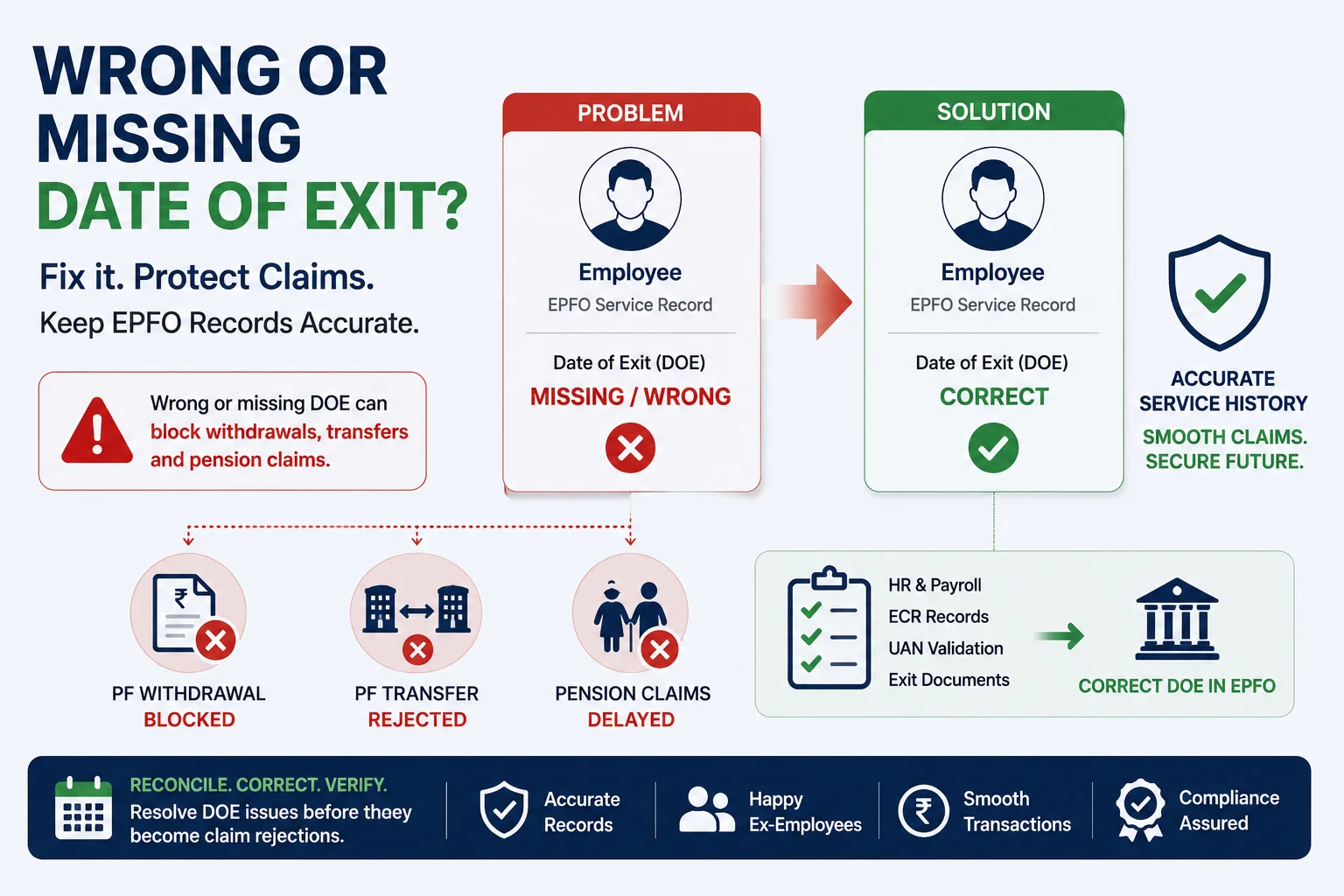
A Date of Exit (DOE) is the date EPFO records as the end of an employee's service with a given establishment. When it's missing, wrong, or the employee still shows as active, EPFO blocks the transactions that depend on it: PF withdrawal (Form 19), PF transfer to a new employer, and pension-related claims tied to service history.
Employers can correct straightforward cases directly through the EPFO Employer Portal. More complex or historical cases go through a Joint Declaration — a combined employer-employee request reviewed by the Regional PF Commissioner — or, for many current employees, through EPFO's employee-side self-service Mark Exit facility. Before filing anything, reconcile HR, payroll, and EPFO records — a large share of reported "DOE issues" turn out to be a mismatch elsewhere, not the exit date itself.
An accurate DOE unlocks:
- PF withdrawal eligibility (Form 19)
- PF transfer between establishments
- Accurate service history for pension processing
- Correct current-employment status in EPFO's system
Is This a Date of Exit Problem?
Employers rarely find DOE problems by auditing for them — they find them when former employees start reporting stuck claims. Use this to triage the report before assuming it's a DOE issue.
| Employee reports | Likely DOE-related cause |
|---|---|
| Can't submit Form 19 | Missing Date of Exit |
| PF transfer claim rejected | Incorrect or missing DOE |
| EPFO still shows them as employed | Exit was never updated |
| Service history looks incomplete | Wrong exit details on file |
| Several ex-employees report the same issue at once | Process failure, not an individual error |
| Pension claim delayed | Service record needs review |
Kustodian's Diagnostic Rule: If more than one former employee from the same establishment reports an exit-related PF issue in a short window, treat it as a process failure and review exit records in bulk. Resolving complaints one at a time is almost always slower.
Why Date of Exit Goes Wrong
A missing or wrong DOE is rarely EPFO's error. In most cases, it originates inside the employer's own HR, payroll, or offboarding workflow.
| Root cause | How it happens | Business risk |
|---|---|---|
| Exit never updated | Offboarding process incomplete | High |
| Payroll–HRMS mismatch | Systems fell out of sync | High |
| Previous PF consultant missed it | Historical backlog | High |
| Manual entry error | Wrong date keyed in | Medium |
| Employee rejoined later | Multiple employment records need validation | Medium |
| Wrong UAN mapped | Correction applied to the wrong record | High |
| Legacy migration issue | Historical data imported incorrectly | High |
A pattern we see often: a mid-sized company switches payroll vendors or PF consultants, and exits recorded before the switch never get carried over and updated in EPFO. Nobody notices until 12–18 months later, when a batch of former employees — sometimes dozens at once — start reporting rejected withdrawals or transfers. By the time it surfaces, it's no longer one record to fix. It's a backlog.
Impact on Your Organization
A single wrong record takes minutes to investigate. The same issue across dozens of former employees needs a structured review — which is the rest of this guide. Left unresolved, it typically shows up as:
- Rising HR support tickets from former employees
- Manual investigation work eating into HR/payroll time
- A full "historical correction project" instead of a routine fix
- Employee dissatisfaction and reputational cost with alumni
- Compliance and audit observations at scale
Before You Raise a Correction: Validation Checklist
Not every withdrawal or transfer complaint is actually a DOE problem — some are UAN mapping errors or unfiled ECRs wearing a DOE costume. Check these before filing anything:
| Check | Why it matters |
|---|---|
| HR confirms the employee has formally exited | Confirms employment actually ended |
| Final payroll and settlement processed | Exit should align with payroll records |
| Last ECR filed successfully | Confirms contributions were reported |
| Correct UAN linked to the employee | Prevents correcting the wrong record |
| Employee hasn't rejoined the same establishment | Rejoining changes the correction approach |
| EPFO portal DOE matches HR records | Flags the obvious mismatches early |
Kustodian Best Practice: Reconcile HRMS, payroll, and EPFO before filing a correction. A large share of "DOE issues" turn out to be a data mismatch somewhere else in the chain — not the exit date itself.
The Most Common DOE Problems — and What Can Be Fixed
| Problem | Typical cause | Employer can usually fix it? |
|---|---|---|
| DOE missing | Exit never updated | Yes |
| DOE incorrect | Manual entry error | Yes |
| DOE future-dated | Data entry mistake | Yes |
| DOE recorded under wrong UAN | Wrong employee mapped | Often |
| Employee shows active after resigning | Exit process incomplete | Yes |
| Historical records missing exits | Legacy payroll/consultant gap | Yes, usually via Joint Declaration |
| Employment history conflicts across establishments | Multiple or inconsistent records | Case-by-case |
How to Actually Correct a Date of Exit
There are three distinct correction paths, and using the wrong one is the single biggest cause of delay.
1. Employee self-service (Mark Exit). For UANs issued after October 1, 2017 (Aadhaar-linked), employees can often correct their own DOE directly on the EPFO Unified Member Portal, under Manage → Mark Exit, without employer involvement. Two conditions typically apply: it becomes available only about two months after the last employer contribution, and it can generally be used once per record. Point exiting or exited employees here first for straightforward, current cases — it's the fastest path, and it takes the request off your team's plate entirely.
2. Joint Declaration (employer-routed). For cases outside self-service — wrong UAN, historical records, disputed dates, or employees who need employer sign-off — the correction runs through a Joint Declaration: a combined employer-employee request submitted via the Unified Portal (Manage → Joint Declaration) and reviewed by the Regional PF Commissioner. Employer-routed requests typically take three to four weeks end-to-end, and the most common cause of delay isn't EPFO — it's the request sitting unopened in the employer's own portal queue. Our Joint Declaration guide covers the full field-by-field process.
3. Physical Joint Declaration (exceptions). A handful of cases still need a paper JD with employer signature and stamp: the establishment has closed, the member is deceased and a nominee is filing, or the account predates UAN/Aadhaar linkage (pre-2017).
Before you file: EPFO's rules around online self-service and Joint Declaration have changed more than once since 2024. Confirm the current process on the official EPFO portal before advising employees — this section reflects the process as of publication, not a guarantee it hasn't since been updated.
Need help correcting your Date of Exit (DOE) or unsure which correction path applies? Schedule a free Kustodian consultation with our EPF experts. We'll review your records, explain the correct correction process for your case, and help identify issues with your UAN, service history, or employer records before they delay your transfer, withdrawal, or pension claim.
Kustodian's 5-Step Bulk DOE Correction Framework
When more than one employee is affected, correcting records one at a time is the slow path. Work the backlog as a project instead.
- Identify — compile everyone who's reported a withdrawal or transfer issue, plus anyone who exited around a known payroll or consultant transition.
- Validate — cross-check HRMS, payroll, final settlement records, and the EPFO Employer Portal to establish one source of truth per employee.
- Prioritize — fix by business risk, not discovery order (table below).
- Correct — file via the right path from the section above. Don't batch-submit without validating each record first, or you'll create new inconsistencies.
- Verify — confirm the corrected DOE shows in EPFO, service history is intact, and the employee can complete the transaction they originally came to you about. Log the correction for your own audit trail.
| Priority | Example |
|---|---|
| Critical | Active employee wrongly marked as exited |
| High | Former employee blocked from withdrawal or transfer |
| Medium | Wrong exit date, no active complaint yet |
| Low | Minor historical inconsistency found during audit |
Running this checklist against more than a handful of employees? Request a free Bulk DOE Audit → and we'll map exactly which records are affected before you commit resourcing.
Who Owns the Fix?
| Activity | HR | Payroll | PF Consultant | EPFO |
|---|---|---|---|---|
| Verify employee exit | ✓ | |||
| Validate payroll records | ✓ | |||
| Review EPFO records | ✓ | ✓ | ✓ | |
| Prepare correction data | ✓ | ✓ | ✓ | |
| Historical reconciliation | ✓ | |||
| Review exceptional cases | ✓ (where required) |
Ambiguous ownership is why DOE backlogs sit unresolved for months. Assign these before you start, not after the first complaint.
Preventing Future DOE Errors
Correcting the backlog solves today's problem. A monthly reconciliation habit prevents the next one — and costs far less than another historical correction project.
| Stage | Action | Owner | Cadence |
|---|---|---|---|
| Resignation accepted | Record final working day | HR | Per exit |
| Payroll closure | Process final payroll and settlement | Payroll | Per exit |
| Exit update | Update DOE in EPFO where applicable | HR/Payroll | Per exit |
| Recent-exit reconciliation | Match last month's exits against EPFO | HR/Compliance | Monthly |
| Historical audit | Review older records for gaps | Compliance/Consultant | Annually |
Kustodian Recommendation: Put "EPFO Exit Reconciliation" on your compliance calendar as a recurring monthly item. Reviewing last month's exits takes minutes; investigating three years of them after employees start complaining takes weeks.
Quick Decision Guide
| If... | Then... |
|---|---|
| DOE is missing entirely | Confirm HR/payroll show the employee as exited, then file the correction using the right path above |
| DOE is present but wrong | Verify against payroll and ECR records, then correct via the same paths |
| DOE looks correct but the employee still can't withdraw or transfer | The issue likely isn't DOE — check UAN linkage, KYC status, and ECR filing instead |
| Multiple employees affected | Skip individual correction — run the Bulk DOE Correction Framework above |
(Production note: render this as a simple branching flowchart graphic rather than a table — same logic, visual format.)
FAQs
What happens if the Date of Exit is missing in EPFO? The employee's PF withdrawal and transfer requests will typically stall, and EPFO's records may still show them as actively employed.
Can employers correct historical DOE records after several years? Usually yes, through a Joint Declaration, though the process and documentation required depend on how old the record is and whether the establishment is still active.
Does a wrong DOE affect pension (EPS) records? Yes. DOE feeds into service history, which pension processing relies on — review it as part of any correction, not as an afterthought.
Can employees correct their own DOE without the employer? For many current cases, yes, through EPFO's self-service Mark Exit facility, if the UAN is Aadhaar-linked and issued after October 2017. Employer involvement is still required for disputed, historical, or wrong-UAN cases.
How long does an employer-routed correction take? Typically three to four weeks once filed correctly. The most common delay is the request sitting unactioned in the employer's own portal queue.
What documents should we have ready before filing? HR exit records, final payroll, the last ECR filing, UAN details, and — for transfer-related cases — employment history at the previous establishment.
Can multiple employees' records be corrected at once? Yes. Beyond a couple of cases, a bulk review is faster than resolving complaints one at a time — see the Bulk DOE Correction Framework above.
Who should own DOE corrections internally? Split it across HR, payroll, and your PF consultant as shown in the ownership table above. Unclear ownership is the most common reason corrections stall.
Related Resources
Employer guides
- EPF Joint Declaration Form: DOJ/DOE, Name & DOB Correction Guide — the field-by-field correction process referenced above
How Kustodian Helps
Most DOE backlogs aren't a knowledge gap — they're the accumulated residue of payroll switches, consultant transitions, and incomplete offboarding over several years. Kustodian runs bulk DOE audits across HRMS, payroll, and EPFO records, prioritizes corrections by business risk, and helps you build the reconciliation habit that prevents the next backlog.
Resolve Date of Exit Issues Before They Become Employee Escalations
We'll identify affected employees, validate historical records, and prioritize corrections — before they turn into a larger project.
Discuss your organization's EPFO records or ongoing compliance process with our employer advisory team.
PF Interest Loss Calculator
See how much interest you lose every month your claim sits unresolved.