You searched for your property on E-Aasthi, and nothing appeared.
For many Bangalore property owners, this is the point where confusion starts. Is the property missing from government records? Can you still apply for E-Khata? Is there a problem with the ownership details?
In most cases, a missing property record does not mean the property does not exist. The issue is usually related to record migration, ownership mismatches, builder-to-owner transfers, or missing property identifiers such as the ePID.
This guide explains how to search for your property on E-Aasthi, what the search results mean, and what to do if your property cannot be found.
Kustodian can help you understand the next steps before starting your E-Khata application.
Quick Answer: How Do You Search a Property on E-Aasthi?
You can search for a property on E-Aasthi using an ePID, SAS Number, owner name, or application number. The ePID is usually the most accurate method.
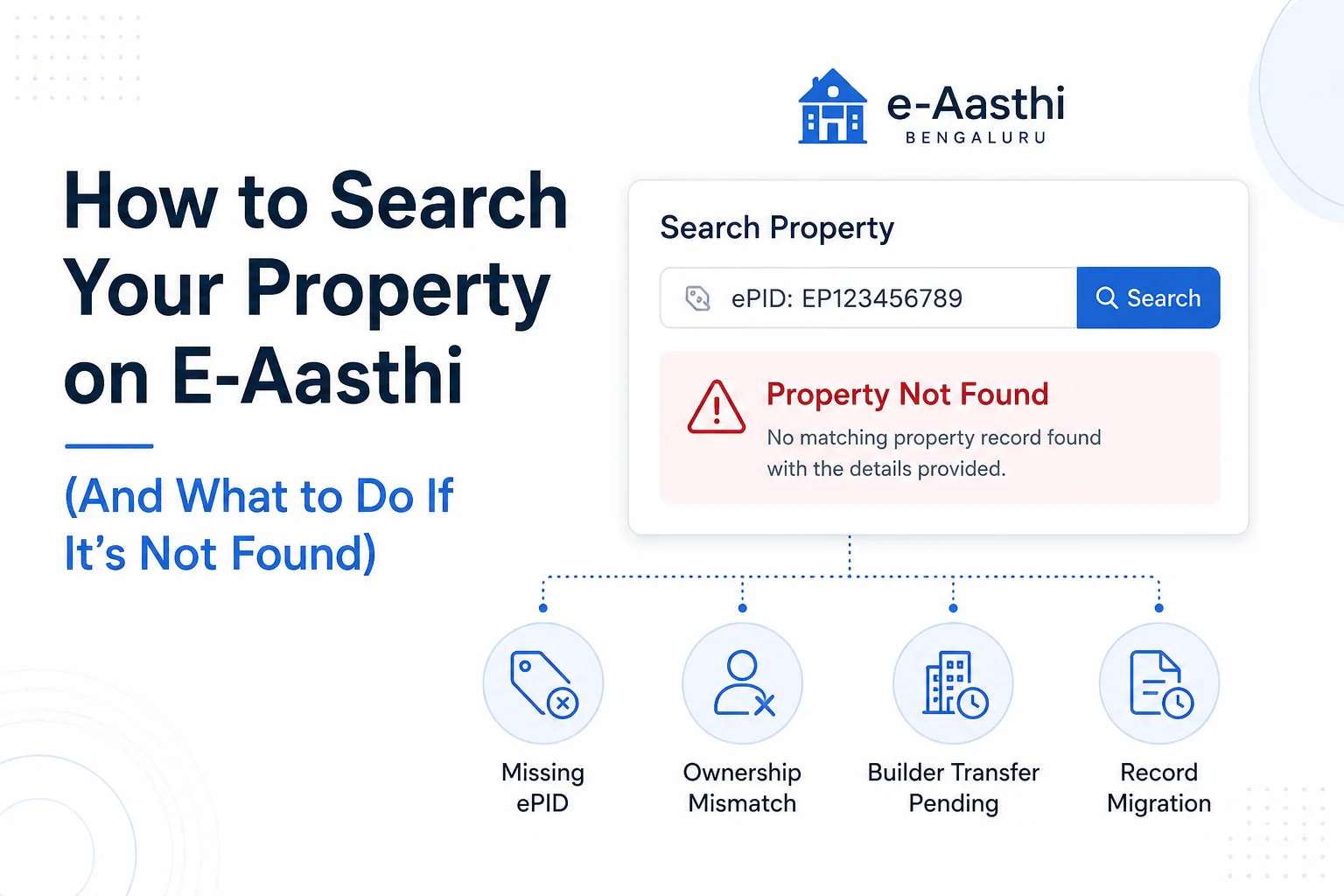
If your property is not found, the most common causes are:
- Missing ePID mapping
- Ownership mismatches
- Builder transfer issues
- Recent registrations have not yet been reflected
- Legacy records that have not been fully migrated
Can't Find Your Property on E-Aasthi?
Missing property records are often caused by ePID mapping issues, ownership mismatches, or incomplete record migration—not necessarily a problem with your ownership.
👉 Kustodian can help identify the issue and guide you through the next steps for your E-Khata application.
1. Common E-Aasthi Search Problems at a Glance
| Issue | Most Likely Cause | Next Step |
|---|---|---|
| Property not found | Record migration issue | Verify property records |
| Wrong owner shown | Ownership mismatch | Review ownership details |
| Missing ePID | Property mapping issue | Check tax records |
| Apartment not appearing | Builder transfer pending | Verify ownership transfer |
| Multiple records found | Duplicate or overlapping records | Review carefully |
A "Property Not Found" result usually indicates that the system could not find a matching record using the information provided. It does not necessarily mean that the property is absent from government records.
2. How to Search Your Property on E-Aasthi
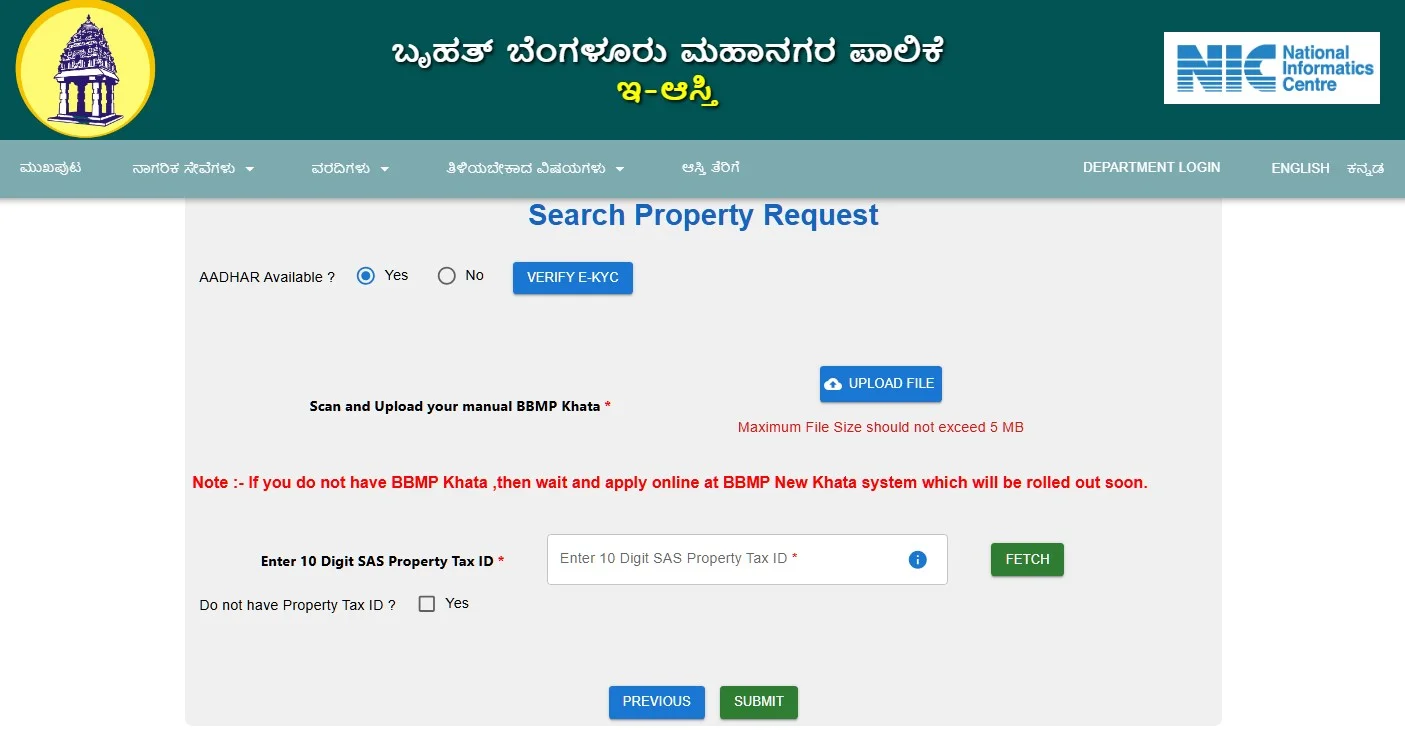
e-Aasthi allows property owners to search for property records using different identifiers. The most reliable option is the ePID (Electronic Property Identification Number), followed by the SAS Number, owner name, or application number.
Search Methods Available
| Search Method | Best Used When |
|---|---|
| ePID | You have the property's unique identifier |
| SAS Number | You have property tax records |
| Owner Name | Property identifiers are unavailable |
| Application Number | You recently submitted a request |
Steps to Search
- Open the E-Aasthi property search portal.
- Select your preferred search method.
- Enter the required details.
- Review the matching property records.
If possible, use the ePID because it is designed to identify a specific property record and typically produces the most accurate results.
If a search returns no results, try another identifier before assuming the property is missing. For example, a property that cannot be found using an owner's name may still appear when searched using an ePID or SAS Number.
The search itself usually takes less than a minute. The more important step is understanding what the result means—and what action to take if your property cannot be found.
3. What Your E-Aasthi Search Result Means
Finding a property record is only the first step. Different search results can indicate different stages of property verification, ownership updates, or E-Khata processing.
| Search Result | What It Means |
|---|---|
| Draft Record Found | Property exists in the system but may still require verification |
| Final E-Khata Found | The record has been verified and finalized |
| Multiple Records Found | More than one matching record exists |
| No Record Found | The property could not be located using the details entered |
Draft Record Found
A draft record usually means the property has been mapped into the system and is awaiting verification or finalization. This is generally a positive sign because the property already exists within E-Aasthi records.
Final E-Khata Found
A finalized record indicates that the property has completed the E-Khata verification process. You should still verify that ownership and property details are correct.
Multiple Records Found
This often occurs when searching by owner name or when duplicate records exist. Review the property details carefully before proceeding.
No Record Found
This does not necessarily mean the property is missing from government records. In many cases, the issue is related to ownership mismatches, missing ePID mapping, builder transfer delays, or record migration issues.
Need Help Finding Your Property on E-Aasthi?
Searching for a property on E-Aasthi can be frustrating when records do not appear as expected. Whether you're dealing with a missing ePID, ownership mismatch, builder transfer issue, or E-Khata concerns, Kustodian can help you understand the issue and determine the right next steps.
4. Why Your Property May Not Appear on E-Aasthi
If your property cannot be found on E-Aasthi, the issue is usually related to one of five areas: timing, ownership, property identifiers, apartment transfers, or record migration.
The table below summarizes the most common causes.
| Problem | Most Likely Cause | What To Do |
|---|---|---|
| Property missing after purchase | Registration updates have not been reflected yet | Wait and recheck |
| Apartment not found | Builder transfer pending | Verify ownership records |
| ePID unavailable | Property mapping issue | Check tax and property records |
| Wrong owner shown | Ownership mismatch | Review the ownership chain |
| Older property not found | Legacy record migration issue | Verify historical records |
Recently Purchased Property
If you recently purchased a property, there may be a delay before the ownership and property records become visible through E-Aasthi.
A completed registration does not always mean every related system has been updated immediately. Property records often move through multiple administrative updates before they appear consistently across digital platforms.
This is especially common when:
- The registration was completed recently
- Ownership has just changed
- Property records are still being synchronized
If the property was registered only a few weeks ago, waiting and checking again later may be reasonable before assuming there is a record issue.
Apartment Still Linked to the Builder
Many apartment owners encounter search issues because the unit is still linked to the builder or developer within the underlying records.
Large residential projects are often transferred in phases, and ownership updates do not always appear immediately at the individual apartment level.
As a result:
- The apartment may not appear under the owner's name
- Builder information may still be associated with the property
- Individual units may be difficult to locate through the search
If you own an apartment and recently took possession, this is one of the first areas worth investigating.
Missing or Unmapped ePID
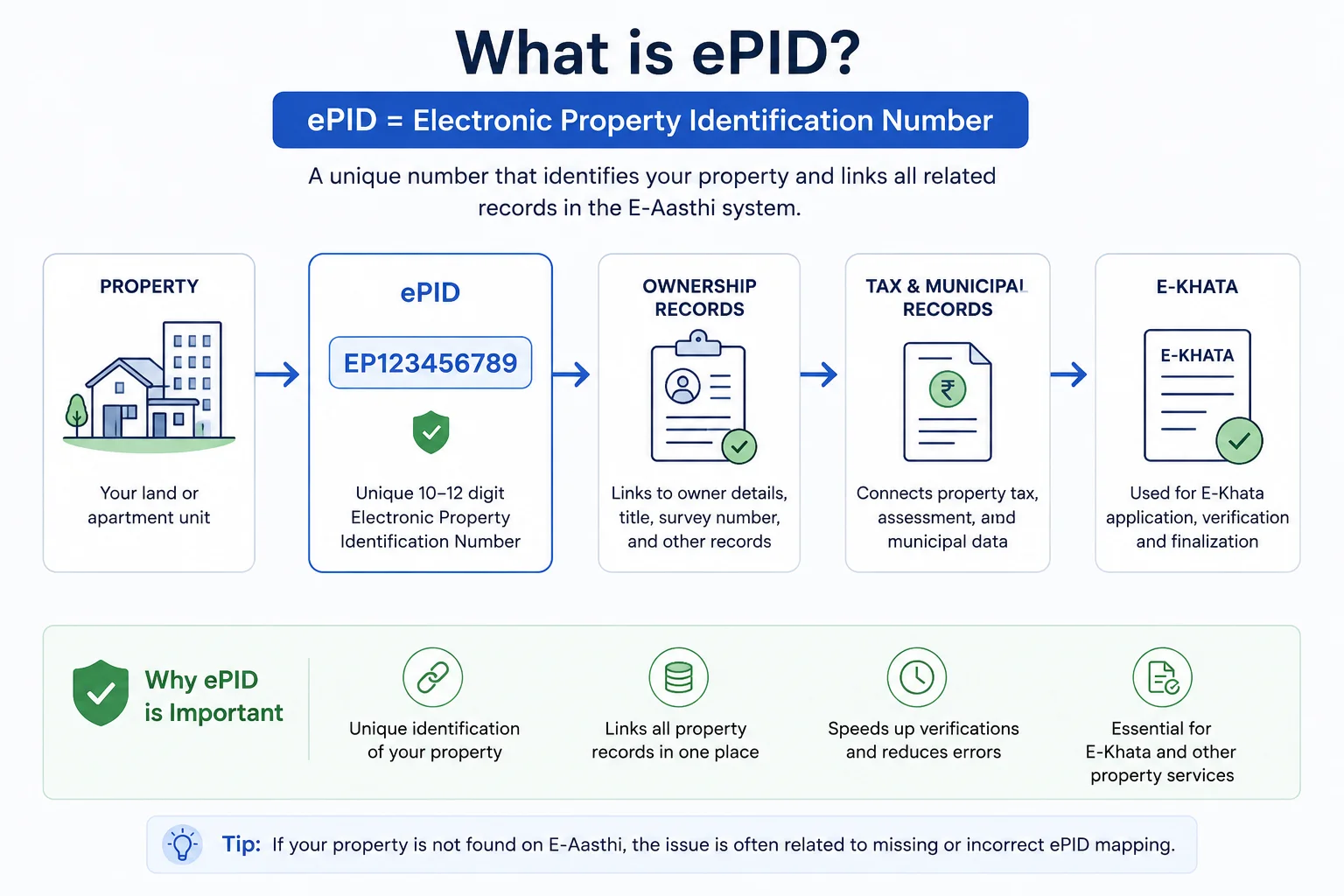
The ePID (Electronic Property Identification Number) is one of the most important identifiers within the E-Aasthi ecosystem.
When an ePID is missing, incomplete, or incorrectly mapped, a property can become difficult to locate even if other records exist.
This is often why property owners find themselves in a confusing situation where:
- Property tax records exist
- Registration documents exist
- Ownership documents exist
—but the property still does not appear during the search.
If your property cannot be found and no ePID is available, verifying the property's identifiers should be a priority before starting any new application.
Ownership Mismatch
A property may fail to appear in search results because the ownership information being searched does not match the ownership information stored within the records.
This commonly occurs after:
- Property purchases
- Inheritance transfers
- Family settlements
- Joint ownership changes
Even small differences in ownership information can affect search results.
For example, the property may still be linked to a previous owner, a joint owner, or an older version of the owner's name.
If your search results show another owner—or no result at all despite having supporting documents—reviewing the ownership chain is often the next logical step.
Legacy Records Not Yet Fully Migrated
Not all properties originated within modern digital systems.
Older properties may have records that were created under previous municipal authorities, older administrative frameworks, or paper-based record systems.
As records are digitized and migrated, some properties can temporarily become difficult to locate through online searches even though the underlying records still exist.
This issue is more common for:
- Older properties
- Converted sites
- Former Panchayat properties
- Properties with a long ownership history
If your property has existed for many years and cannot be found online, reviewing historical property documents can help determine whether the issue is related to record migration rather than ownership itself.
5. What Should You Do If Your Property Is Not Found?
The right next step depends on why the property is missing.
In many cases, the issue can be narrowed down quickly by looking at the property's history, ownership status, and available identifiers.
| Situation | Recommended Action |
|---|---|
| Property purchased recently | Wait and check again after the records are updated |
| Apartment not appearing | Verify builder-to-owner transfer status |
| ePID unavailable | Review property tax and identification records |
| Wrong owner shown | Verify ownership details and supporting documents |
| Older property missing | Check historical and migration-related records |
| Property is still missing after multiple checks | Investigate record inconsistencies |
A useful rule of thumb is:
- Recent transactions often have timing issues.
- Missing ePIDs are usually mapping issues.
- Wrong ownership details are recorded as issues.
- Older properties often have migration issues.
The sooner the underlying cause is identified, the easier it becomes to avoid delays in E-Khata applications, ownership transfers, property sales, or inheritance-related transactions.
If your property remains missing despite having valid ownership and tax records, focus on verifying the property's identifiers and ownership information before submitting new applications or requests.
If you're unsure whether the issue is related to ownership records, ePID mapping, builder transfers, or legacy record migration, Kustodian can help review your property details and identify the most likely cause before you proceed further.
6. Can You Apply for E-Khata If Your Property Is Not Found?
Not always.
Whether you can proceed with an E-Khata application depends on the reason the property is missing from E-Aasthi.
A missing search result does not automatically mean the property is ineligible for E-Khata. In many cases, the underlying issue is a missing identifier, ownership mismatch, pending transfer, or record migration problem.
| Situation | Can You Proceed? |
|---|---|
| Draft record found | Usually yes |
| Final E-Khata found | Already completed |
| Missing ePID | Often needs resolution first |
| Ownership mismatch | Usually requires correction |
| Builder transfer pending | May require ownership updates |
| Record migration issue | May require verification before proceeding |
The key question is not whether the property is missing from search results. The key question is why it is missing.
For example, a recently purchased property may simply require additional time for records to update. On the other hand, an ownership mismatch could affect the application process itself and should usually be addressed first.
If you are unable to locate the property, identifying the root cause early can help prevent delays later in the E-Khata process.
If you are unable to locate the property, identifying the root cause early can help prevent delays later in the E-Khata process. Kustodian helps property owners understand and resolve common record-related issues before beginning their E-Khata application.
7. Frequently Asked Questions
Why is my property not showing on E-Aasthi?
The most common reasons are recent registration updates, ownership mismatches, missing ePID mapping, builder transfer delays, or legacy records that have not yet been fully migrated into the system.
How do I search for a property on E-Aasthi?
You can search using an ePID, SAS Number, owner name, or application number. The ePID is generally the most accurate search method because it uniquely identifies a property record.
What is an ePID number?
An ePID (Electronic Property Identification Number) is a unique identifier assigned to a property within the E-Aasthi system. It helps link ownership, tax, and property records to a specific property.
Can I apply for E-Khata if my property is not found?
It depends on the reason the property is missing. Some issues, such as recent registration updates, may resolve over time, while ownership mismatches or missing identifiers may need to be corrected before proceeding.
Why does E-Aasthi show the wrong owner?
This usually indicates an ownership mismatch or an ownership update that has not yet been reflected across records. Reviewing the property's ownership history can help identify the issue.
Why can't I find my apartment on E-Aasthi?
Apartments may not appear if ownership records are still linked to the builder or if project-level records have not yet been fully updated to reflect individual unit ownership.
Can I search using my name?
Yes. However, owner-name searches are generally less reliable than searches using an ePID or SAS Number because names can change, be recorded differently, or be associated with multiple properties.
What should I do if multiple records appear?
Review the ownership details, property identifiers, and property description carefully before proceeding. Multiple results are more common when searching by owner name.
Does paying property tax mean my property will appear on E-Aasthi?
Not necessarily. Property tax records can help identify a property, but issues related to ownership, migration, or ePID mapping can still affect whether the property appears in search results.
How long does it take for a newly purchased property to appear?
The timeline varies depending on how quickly ownership and property records are updated. Recently registered properties may take time to appear even after the registration process is complete.
If your property is not appearing on E-Aasthi, the issue may be related to ownership records, ePID mapping, builder transfers, or legacy record migration. Kustodian helps property owners navigate these challenges and understand the next steps for E-Khata and property record verification.