
Last updated: July 2026
If your e-Khata application has been approved, the certificate is downloaded from the official e-Aasthi portal using your ePID, Application Number, or property details. This guide covers the download itself, and — because this is where most people actually get stuck — what to do when an approved application still shows no certificate.
Scope note: This applies to properties within BBMP limits (Bengaluru city). If your property falls under a Panchayat, the equivalent document is an e-Swathu, not an e-Khata, and the process differs. If your property has never had any khata at all, you'll apply through BBMP's New Khata portal rather than converting an existing one.
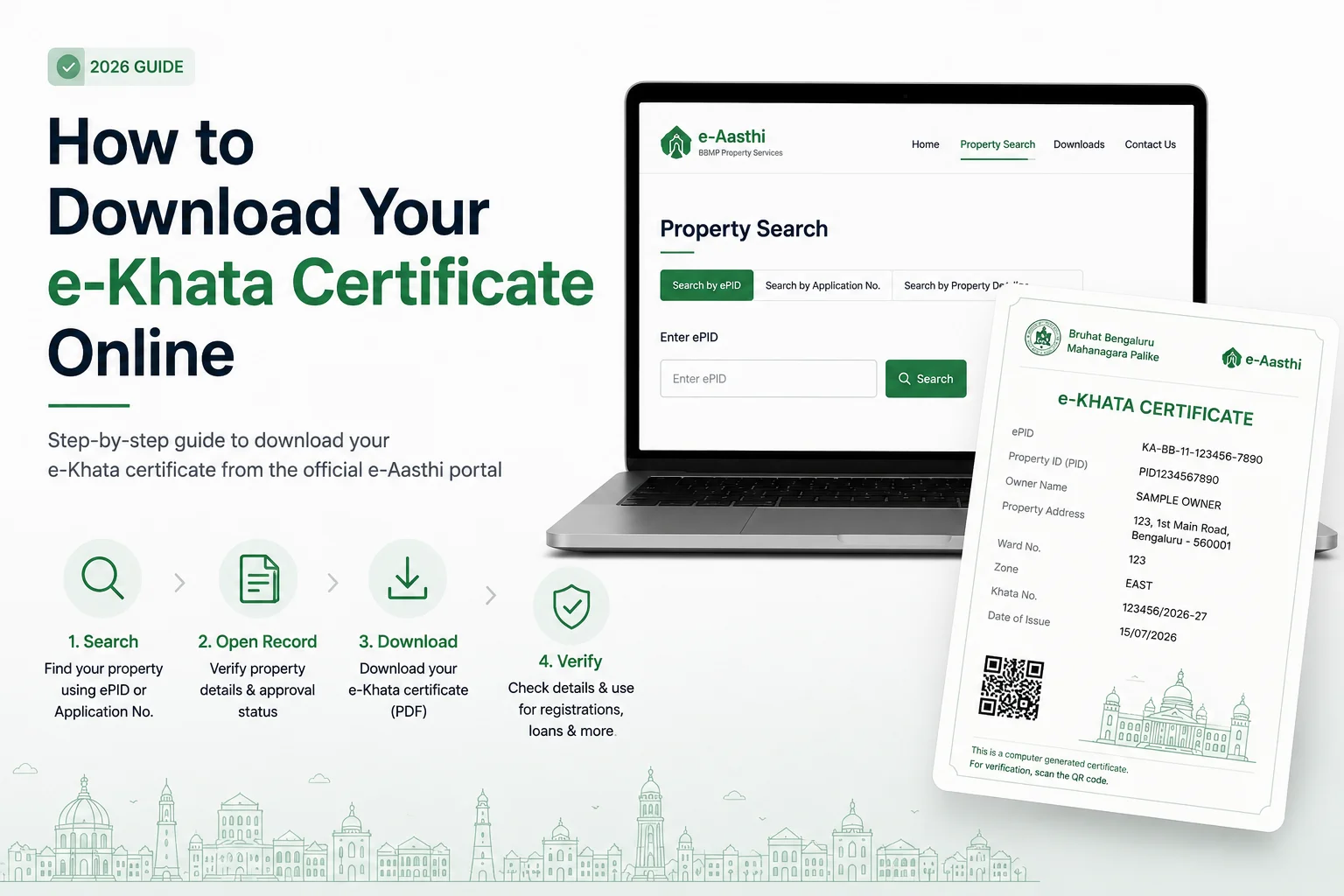
Quick Answer
Most people download their certificate in under five minutes:
- Open the e-Aasthi portal.
- Search using your ePID or Application Number.
- Open the approved property record.
- Download the certificate PDF.
If the certificate isn't there yet, that's usually not a rejection — approval, property-record sync, and certificate generation happen in separate backend steps, and a gap between them is normal for a window of time. If it's still missing well past that window, the cause is almost always a record-level issue (wrong identifier, ownership mismatch, mapping error) rather than a problem with the approval itself.
How to Download an e-Khata Certificate: Step by Step
Step 1: Open the Official e-Aasthi Portal
Go directly to bbmpeaasthi.karnataka.gov.in — not a third-party aggregator. Aggregator sites often show cached or outdated property data, which is a common cause of the "wrong property" problem later in this guide.
Outcome: You land on the property search page.
Step 2: Search for Your Property
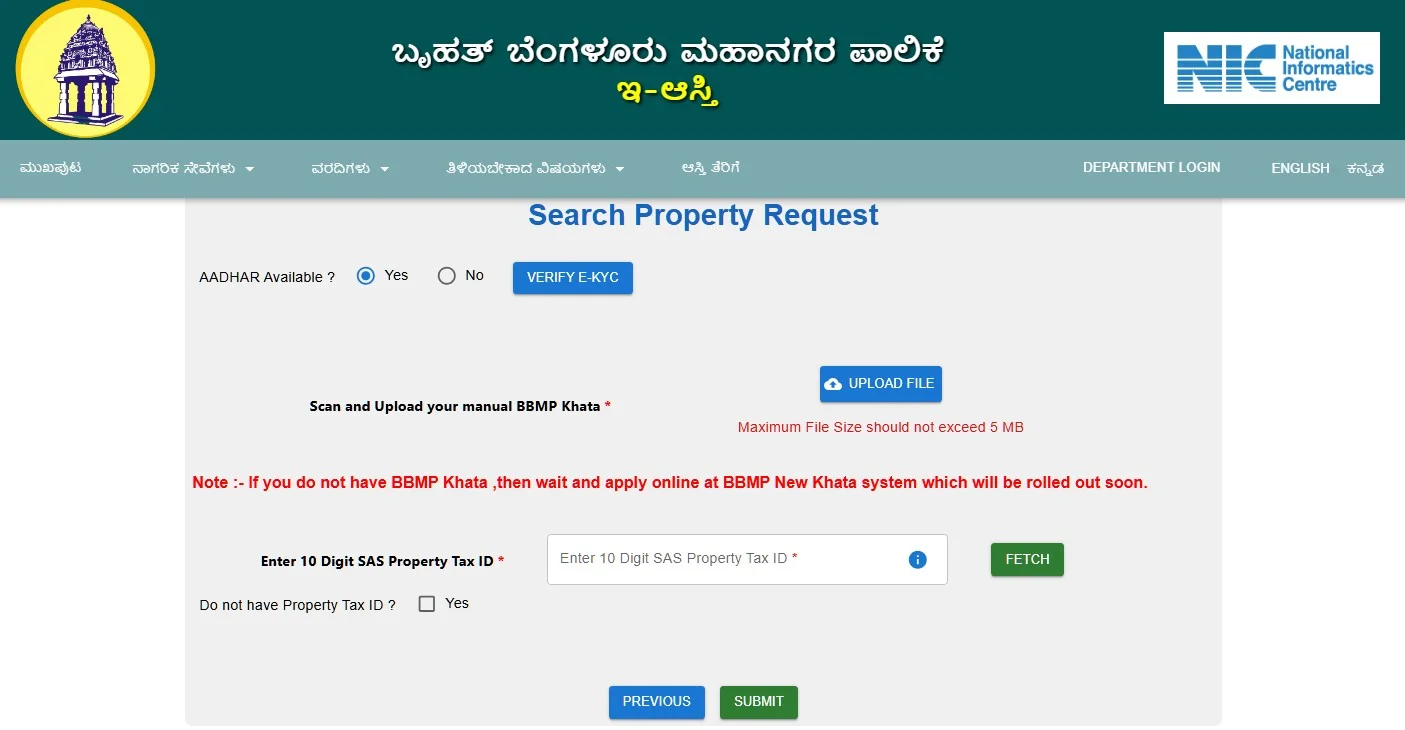
Search using one of:
- ePID — the fastest route if you already have your draft e-Khata or e-property ID
- Application Number — from your application acknowledgment
- Property details (zone, ward, owner name) — if you have neither of the above
Not sure which identifier does what? See ePID vs PID vs Application Number below before you search — using the wrong one is the single most common reason a correct application returns no results.
Outcome: your property record appears in the results.
Step 3: Open and Verify the Property Record
Before downloading anything, confirm the record actually matches:
- Owner name
- Property address
- Property identifier (ePID/PID)
If more than one property appears — common in multi-unit buildings or where an old khata was split — check the identifier on each one before proceeding. Downloading the wrong property's certificate causes problems later at registration or loan stages, not at download time, so it's easy to miss.
Outcome: the property details page opens.
Step 4: Download the Certificate
If generation is complete, a download link appears on the record page. Save the PDF locally — you'll likely need it again for bank loan processing, registration, or future property tax filings, and re-downloading later requires repeating this whole search.
Outcome: the certificate PDF is on your device.
Step 5: Verify What You Downloaded
Open the PDF and check property details, owner information, identifier, and certificate details against your own records before using it anywhere official. If anything is wrong, the fix is almost never on your end — see What If the Certificate Has Errors below.
Outcome: a verified, ready-to-use certificate.
Before you use your e-Khata certificate for registration, a home loan, or building approvals, verify that every detail is accurate. A quick review now can help you avoid rejected applications, processing delays, and time-consuming corrections later.
Before You Start: Readiness Checklist
| You need | Why | Where to find it |
|---|---|---|
| ePID | Locates the digital property record | Your draft e-Khata or prior e-Aasthi correspondence |
| Application Number | Retrieves the specific application | Application acknowledgment email/SMS |
| Property details | Confirms you've got the right record | Property tax receipt or sale deed |
| Confirmed approval | Certificates only generate post-approval | Your approval notification |
Having all four before you start search cuts failed searches dramatically — most support requests we see trace back to one of these being wrong or missing, not a portal fault.
Why an Approved Certificate May Not Be Downloadable Yet
Approval, property-record update, and certificate generation are three separate backend stages, not one event. This is the sequence:
- Application submitted
- Application approved
- Property record updated in the municipal database
- Certificate PDF generated
- Certificate available for download
A gap between stage 2 and stage 5 is expected. A gap that persists well beyond a reasonable sync window usually means the process has stalled at stage 3 — typically due to a record-level issue, not a re-review of your approval.
Real example: A property owner approved in April couldn't locate their certificate through June. The application itself was fine — the property tax record still listed an old PID that had never been updated to match the new ePID issued under the property's e-Aasthi conversion. Once the PID mismatch was corrected at the record level, the certificate was generated within days. No new application was ever needed.
ePID vs PID vs Application Number {#epid-vs-pid-vs-application-number}
| Identifier | What it identifies | Where you'll find it |
|---|---|---|
| ePID | The digital property record used for e-Khata/e-Aasthi | Draft e-Khata or e-Aasthi correspondence |
| PID | The property for municipal tax purposes (pre-digital) | Property tax receipt |
| Application Number | A specific e-Khata application, not the property itself | Application acknowledgment |
Rule of thumb: use the Application Number to track a pending or approved application, and the ePID to pull up the digital property record itself. If neither returns a result, the PID on your tax receipt is your fallback search term. For a full breakdown of how these three interact — including what to do if they conflict with each other on record — see the ePID Finder Guide.
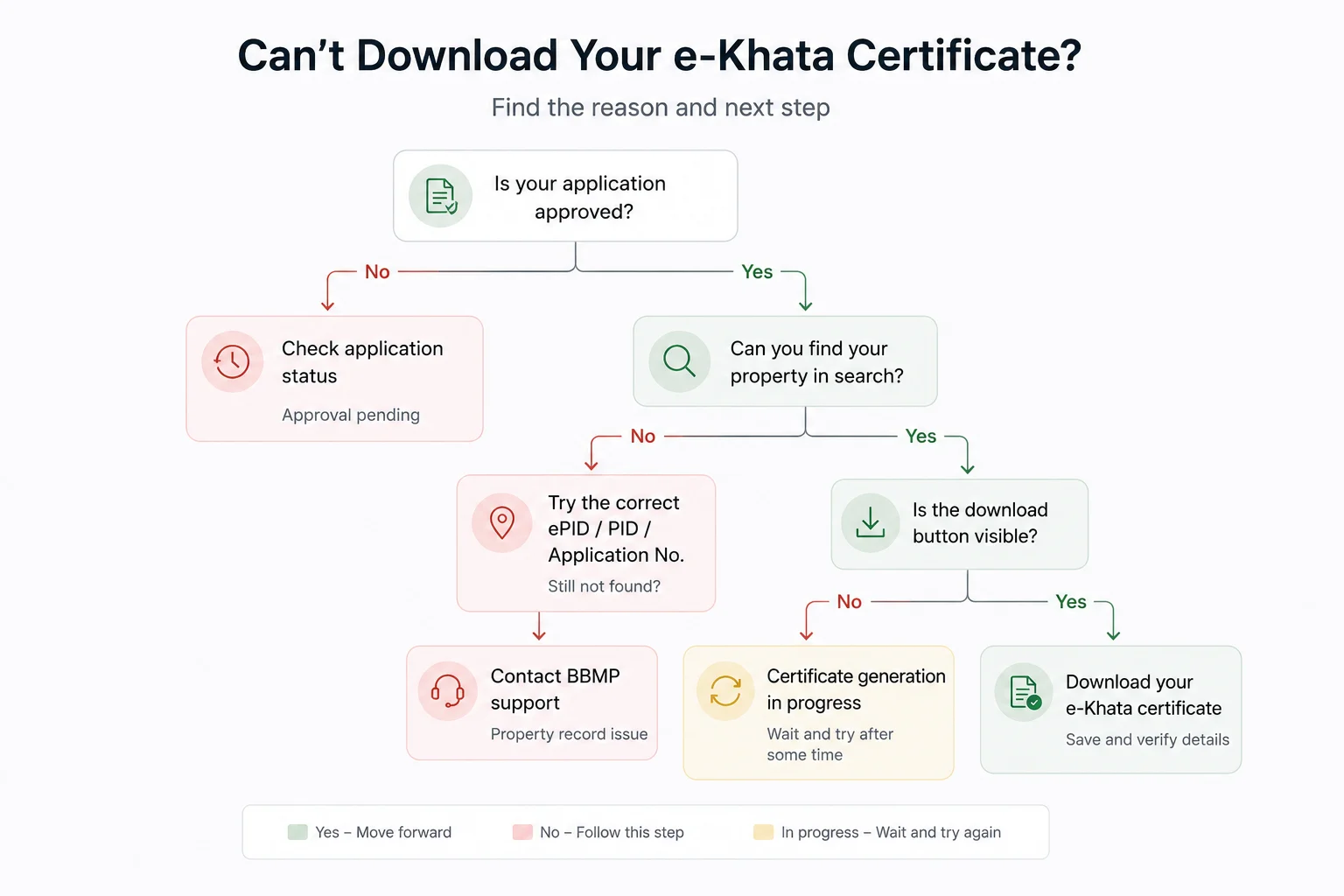
Can't Download Your Certificate? Diagnose It First
| Symptom | Likely cause | What to do |
|---|---|---|
| Approved, but no certificate | Property record sync is still in progress | Wait, then re-check |
| Property not found | Wrong ePID or Application Number | Re-verify the identifier, try the PID as a fallback |
| Wrong property shown | Identifier typo, or split/multi-unit record | Confirm the owner's name + address before downloading |
| No download link on record | Certificate not yet generated | Re-check after the record has synced |
| PDF won't open | Interrupted download or browser issue | Re-download, or try a different browser |
Don't submit a fresh application because a certificate is temporarily missing — that creates a duplicate record, which typically adds delay rather than resolving anything. (This is distinct from an actual rejection; if your application status shows rejected rather than approved, see e-Khata Rejection Reasons instead — the fix there is different.)
Should You Wait or Act? A Decision Path
Work through this in order:
- Is the application approved?
- No → track your status on the How to Check e-Khata Status guide.
- Yes → continue.
- Does the property show up in search?
- No → re-verify your ePID or property details against the table above.
- Yes → continue.
- Is a download link present on the record?
- No → this is normal shortly after approval; wait for record sync and re-check.
- Yes → download it.
- Still no certificate after a reasonable wait?
- This is the point to stop retrying searches and request a property record review instead — see below.
This order matters because it rules out the cheap, fast explanations (wrong identifier, still syncing) before assuming something is actually broken.
Kustodian's Certificate Readiness Check
We review property records for people stuck at exactly this point, and the underlying cause is rarely the certificate process itself:
| Pattern | Effect |
|---|---|
| Owner details don't fully match municipal records | Certificate generation stalls |
| Property mapping discrepancy | Property doesn't show up in search at all |
| Outdated or mismatched identifier | Search returns nothing, or the wrong property |
| Municipal database sync pending | Approved, but nothing downloadable yet |
If you've confirmed the approval, used the right identifiers, and waited — and the certificate is still not there — the fastest path forward is usually a direct review of the property record rather than another search attempt.
FAQ
How long after approval can I download my certificate? There's no fixed timeline — it depends on when the property record syncs and the PDF generates. If it's not there immediately, check again after a few days before treating it as a problem.
Can I download it without an ePID? Often, yes, using the Application Number instead. If you have neither, gather your property tax details and search by property information.
My application is approved, but I can't find the certificate. What now? Confirm you're using the right identifier, you've matched the correct property, and enough time has passed for sync. If it's still missing, the property record — not the certificate — is what needs review.
Why can't I find my property in the search at all? Usually a wrong identifier, a mapping issue, or an incomplete municipal record. This is a record problem, not a search problem, and no amount of retrying the search will fix it.
Can I re-download the certificate later? Yes — once it's live on the portal, you can retrieve it again whenever you need it. Still worth saving a local copy.
Is the portal PDF the official certificate? Yes, if downloaded directly from the official e-Aasthi portal post-approval, it's the official digital record.
What if the certificate has wrong information? {#certificate-errors} Don't use it for any official purpose until the underlying record is corrected — errors almost always originate at the record level, not from the download itself.
Can a joint owner download it too? Yes — the certificate is tied to the approved property record, not to a single download session, so anyone with the right identifiers can retrieve it through the official portal.
Official Sources
- e-Aasthi Portal — property search, application status, and certificate download
- BBMP New Khata Portal — for properties with no prior khata record
- BBMP — general citizen services and grievance redress
Final Takeaway
Downloading an approved e-Khata certificate is a five-minute task once your property record has synced with the approval. When it isn't there yet, the cause is almost always the record — a mismatched identifier, an outdated PID, or a pending sync — not the approval itself. Work through the identifier check and the decision path above before resubmitting anything. If the certificate is still missing after that, a direct review of the property record, not another download attempt, is what actually resolves it.
![Why E-Khata Applications Get Rejected in Bangalore (And How to Fix Them) [2026]](/_next/image?url=https%3A%2F%2Fwebsite-assets-wix.s3.ap-south-1.amazonaws.com%2Fimages%2Fposts%2F3031ceb9f0274289aad5c5f140be716f.webp&w=828&q=75)