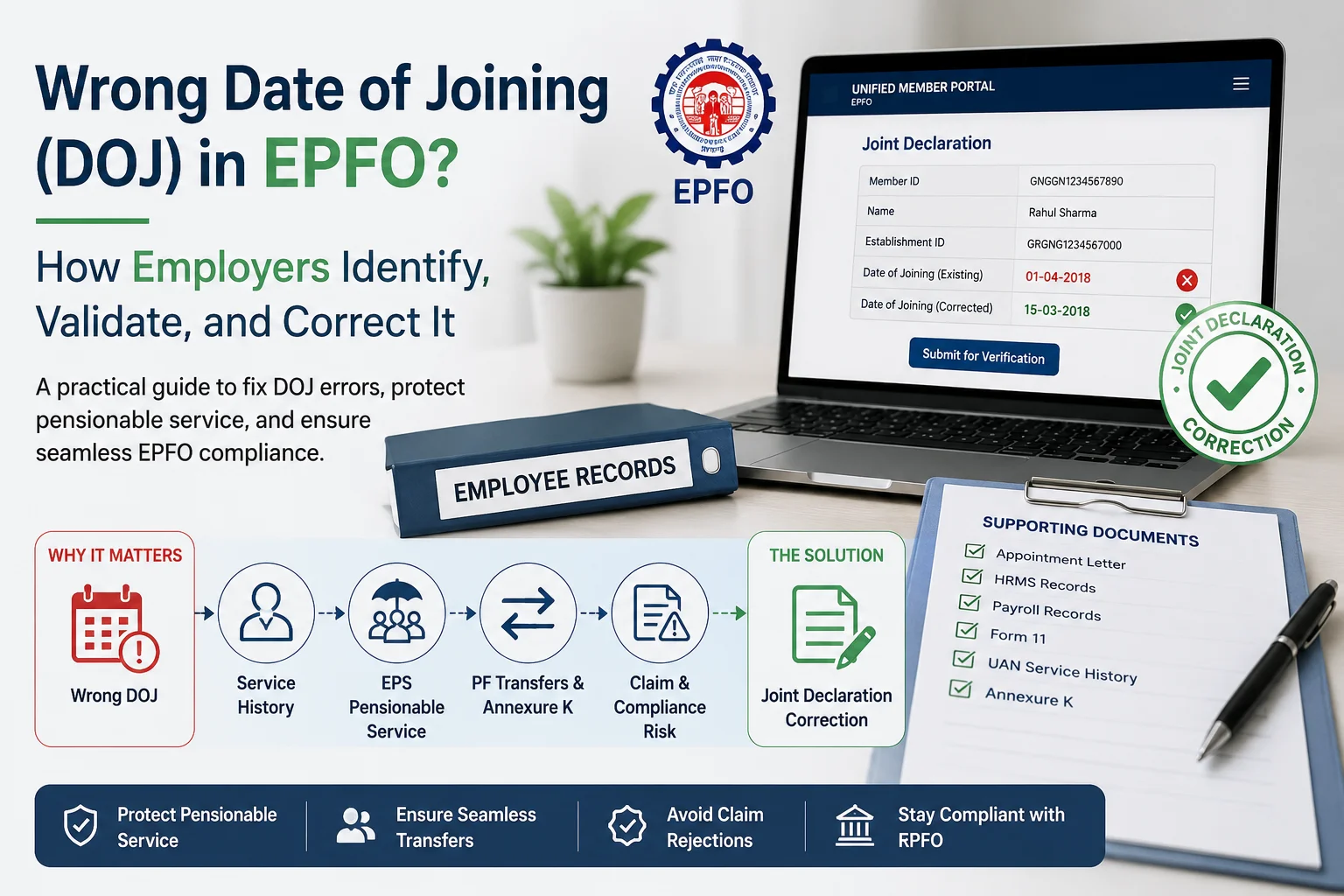
A wrong Date of Joining (DOJ) in EPFO isn't a cosmetic data error. It feeds directly into an employee's pensionable service under EPS, their transfer history, and their Annexure K — and it's rarely a one-off. If one employee's DOJ is wrong, the same onboarding batch, payroll migration, or consultant transition that caused it has usually affected others too.
Employers can correct an incorrect DOJ through EPFO's Joint Declaration (JD) process — a joint request by employer and employee, filed mostly online today, verified against supporting documents and the employee's contribution history. This guide covers how to spot the error, where it actually causes damage, how the correction works in practice, and when one wrong date should trigger a wider audit instead of a single fix.
Quick Answer
| Question | Answer |
|---|---|
| What is DOJ in EPFO? | The date an employee becomes an EPF member under a specific establishment — the anchor point for their service history at that employer. |
| Can employers correct it? | Yes, via a Joint Declaration — employer and employee jointly request the change, mostly online. |
| Does it affect pension (EPS)? | Yes. DOJ errors distort pensionable service and can block EPS claims outright if dates don't reconcile with contribution records. |
| Is there a fixed EPFO timeline? | No official SLA is published for JD processing; in practice, expect anywhere from two weeks to a few months depending on the regional office and documentation. |
| Should I fix it as a one-off or run an audit? | If the error traces to a shared onboarding batch, migration, or consultant transition, treat it as systemic — see the decision framework below. |
Where an Incorrect DOJ Actually Causes Damage
DOJ isn't an isolated field — EPFO references it across an employee's entire lifecycle with the establishment.
| Where DOJ Feeds In | Why an Error Matters |
|---|---|
| Employment service history | Sets the starting point EPFO uses for that employment record. |
| EPS pensionable service | Wrong dates distort years of contribution — the exact number EPS eligibility runs on. |
| PF transfers & Annexure K | Transfer records and Annexure K need dates that reconcile across employers; a mismatch stalls the transfer. |
| Internal compliance & audits | HR-vs-EPFO discrepancies are one of the most common findings in due-diligence and statutory reviews. |
| Future claim processing | EPFO auto-validates claimed dates against ECR contribution history — a mismatch escalates the claim instead of clearing it. |
A single incorrect DOJ can be a simple correction—or a sign of a wider compliance issue. Schedule a free Kustodian consultation to have our EPF specialists review your DOJ records, service history, ECR contributions, Annexure K, and EPS continuity. If the error stems from a payroll migration, onboarding batch, or consultant transition, we'll help you identify affected employees and recommend the right correction strategy before it impacts transfers, withdrawals, or pension claims.
How Employers Usually Discover the Error
Almost nobody catches a wrong DOJ at onboarding. It surfaces later — during a transfer, a retirement calculation, an internal audit, or an employee grievance.
| What You Notice | What It Likely Means |
|---|---|
| EPFO joining date doesn't match HR records | Manual entry or migration error at onboarding |
| Service history looks shorter than it should | DOJ or previous-employment linkage issue |
| Transfer doesn't reflect prior continuity | DOJ or Annexure K needs verification — see our Date of Exit & overlap guide |
| Employee disputes years of service | HRMS, appointment letter, and EPFO record are out of sync |
| Same mismatch across several employees | Not an individual error — a batch, migration, or consultant issue |
That last row is the one to act on fastest. One mismatch is a data-entry fix. A pattern across several employees is a governance problem.
Why DOJ Errors Happen
Four sources cover almost every case we see, and the first two are usually individual while the last two are usually systemic.
Employee information gaps. Missing or unverified previous-employment details at onboarding — check the appointment letter, Form 11, and internal HRMS to establish the true date.
Employer onboarding errors. Manual entry mistakes, a wrong effective date selected in the HRMS, or the wrong establishment mapped during onboarding. If several employees from the same onboarding batch show the same discrepancy, this is procedural, not individual.
Payroll or consultant migration. The largest source of workforce-wide DOJ issues. A single spreadsheet mapping error or date-format mismatch during a payroll, HRMS, or consultant transition can silently populate wrong dates across hundreds of records — and rarely arrives alone. In our audits, a migration-driven DOJ error is routinely accompanied by duplicate UANs, missing exit dates, or broken EPS continuity in the same batch. [Insert your own audit stat here if available — e.g., "X% of migration-related DOJ errors we've reviewed also required a Date of Exit correction."]
Legacy and historical records. Establishment mergers, restructuring, or old digitization projects where HR, payroll, and EPFO records were never fully reconciled.
Five Real DOJ Error Scenarios
Wrong joining year. Appointment letter says 15 July 2020; EPFO shows 15 July 2021. Usually a manual-entry or spreadsheet-formatting error. Impact: distorted service history and EPS continuity, and the most common source of employee disputes over years of service.
Previous employment not carried forward. The employee had prior EPF membership, but continuity wasn't reflected at onboarding — often because Form 11 details weren't verified against UAN history. Surfaces during a transfer, when the employee notices a gap.
Rejoining employee treated as new. An employee leaves and later rejoins, but the second stint is processed as a fresh joining rather than a continuation. Common where historical records sit in archived HR systems.
Payroll or HRMS migration error. Several employees from the same migration batch show identical DOJ mismatches. Indicator: internal audit turns up the same discrepancy pattern across payroll and EPFO records. Fix the whole migrated population, not one record at a time.
Consultant transition error. A new PF consultant re-uploads historical employee data without full validation, carrying forward or introducing incorrect joining dates — frequently alongside incorrect Date of Exit or missing transfer records.
Seeing multiple DOJ errors after a payroll migration, HRMS implementation, or consultant change? That's often a sign of a wider records issue—not an isolated employee mistake. Book a free Kustodian EPF Audit to review your workforce for incorrect Dates of Joining, duplicate UANs, broken service continuity, Annexure K gaps, and other EPF record inconsistencies before they lead to transfer failures, claim rejections, or future pension disputes.
How the Correction Actually Works: The Joint Declaration Process
EPFO doesn't have a separate "DOJ correction form." DOJ, along with date of birth, name, and Date of Exit, is corrected through the Joint Declaration (JD) — a request co-signed by employer and employee, run through EPFO's Joint Declaration workflow under the Unified Member Portal's Manage menu.
How EPFO classifies it. Per EPFO's current Joint Declaration SOP, a DOJ or DOE correction is treated as a "Minor" change when requested while the employee is still active, and as a "Major" change when requested by heirs after the employee's death — major changes carry a stricter documentation bar. This differs from the older, informally applied "12-month gap" rule some HR teams still use; going by that outdated assumption can mean under-preparing the documentation EPFO actually asks for.
The current workflow, in brief:
- Employee (or HR, on their behalf) opens Joint Declaration on the Unified Member Portal and selects the relevant Member ID — corrections are filed per employment record, not per UAN.
- The corrected value is entered against the existing one, with supporting documents (appointment letter, attendance register, relieving letter) uploaded where required.
- Employer verification: HR reviews and digitally signs off using the employer's DSC.
- The request routes to the regional EPFO field office for final approval — EPFO also cross-checks the claimed dates against the employee's ECR contribution history, so a claimed date that doesn't match contribution records will escalate rather than clear automatically.
On timelines: EPFO has not published a fixed SLA for JD processing — the SOP explicitly leaves this open. Employer-side experience typically ranges from a couple of weeks to a few months depending on the regional office and how well-documented the request is.
When the online route doesn't apply: physical filing is still required for closed establishments, deceased-member cases, and pre-2017 records that were never linked to a UAN or Aadhaar.
For the full step-by-step — exact documents by change type, employer-DSC sign-off, and what gets rejected at the HR level before it even reaches EPFO — see our detailed Joint Declaration correction guide.
Employer Validation Checklist, Before You File
| Record | What to Verify |
|---|---|
| Appointment letter | Original joining date |
| HRMS | Employee master data |
| Payroll records | Salary commencement date |
| Form 11 | Previous employment declaration |
| UAN service history | Existing EPFO employment records |
| Annexure K (if applicable) | Transfer/service continuity |
If these disagree with each other, resolve that first — a JD filed against inconsistent internal records is the most common reason a correction gets kicked back.
One Employee, or a Workforce Audit?
- Isolated data-entry error, one employee → validate records, file the Joint Declaration.
- Multiple employees from the same onboarding batch → treat as a batch issue, review the whole cohort.
- Error surfaced after a payroll or HRMS migration → review the entire migrated population, not just the flagged record.
- Error surfaced after a consultant change → validate historical records across all affected employees.
- Repeated employee complaints about service history → this is a signal for a structured, workforce-wide EPFO record review, not a queue of individual tickets.
Business Impact
| Affects | Employee | Employer |
|---|---|---|
| Employment history | ✓ | ✓ |
| EPS pensionable service | ✓ | |
| PF transfers & Annexure K | ✓ | ✓ |
| Compliance/audit exposure | ✓ | |
| Remediation workload | ✓ | |
| Trust & escalations | ✓ | ✓ |
After the Correction Is Approved
Don't treat the updated DOJ as the end of the process — it's one field in a record that may have other dependencies.
- Re-check UAN service history for continuity
- Regenerate Annexure K if a transfer is involved
- Confirm Date of Exit still aligns with the corrected timeline
- Verify EPS service years reflect the update
- Re-check transfer records for any new mismatch the correction introduced
Preventing the Next One
At onboarding: verify the appointment letter, HRMS entry, and Form 11 against each other before the EPFO record is created, and require maker-checker sign-off before submission.
During payroll operations: reconcile HRMS against payroll after any bulk update, validate UAN mapping before upload, and sample-check records after every migration rather than trusting a successful file upload.
Periodically: review high-risk groups on a schedule — employees onboarded before a past migration, employees nearing retirement, and anyone who went through a consultant transition — rather than waiting for a complaint to surface the issue.
FAQ
Can employers correct the Date of Joining in EPFO? Yes, through a Joint Declaration co-signed by employer and employee, with supporting documents establishing the correct date.
Does a wrong DOJ affect EPS pension? Yes — DOJ feeds directly into pensionable service calculations, and a mismatch against ECR contribution history can block an EPS claim outright.
Is there a fixed timeline for EPFO to process the correction? No. EPFO has not published a standard SLA for Joint Declaration processing; in practice it depends on the regional office and documentation quality.
Can one employee's DOJ error mean others are affected too? Often, yes — particularly after a payroll migration, consultant transition, or bulk onboarding upload. Validate the batch, not just the flagged record.
Do employers still need to file a physical form? Only in exception cases — closed establishments, deceased-member claims, and pre-2017 records never linked to a UAN. Most active-employee corrections now go through the online Joint Declaration workflow.
What should be verified after the DOJ is corrected? Service history, Annexure K, Date of Exit, EPS continuity, and transfer records — a DOJ fix can surface or require adjustments to any of these.
Where This Usually Leads Next
A DOJ correction is rarely the only issue in the record. If you're also seeing:
- Missing or incorrect Date of Exit → Fix Date of Exit & overlap errors
- Duplicate UANs across an employee's history → Fix duplicate UAN issues
- Missing service years or pension eligibility gaps → Fixing PF pension errors: Annexure K, DOJ/DOE, EPS
- Onboarding declarations not properly verified → Form 11 guide for employers
If you've found one incorrect Date of Joining, it's worth checking whether the same root cause affected other employees. Run a free EPF audit across the affected records to find out before it surfaces as an employee grievance or an audit finding.
This guide is for general information and reflects EPFO practice as understood at the time of writing. EPFO processes are updated periodically — verify current requirements on the official Unified Portal or with your compliance advisor before filing.
PF Interest Loss Calculator
See how much interest you lose every month your claim sits unresolved.