By the Kustodian team — updated July 2026, using EPFO's current processes and patterns we see repeatedly while helping clients resolve EPF issues.
An EPF Member ID is the account number EPFO assigns for each employment under an EPF-registered employer. Your Universal Account Number (UAN) stays the same for life. Your Member ID usually changes every time you join a new employer — some people call it a PF Member ID or PF account number; all three terms refer to the same thing.
If you've changed jobs, having more than one Member ID under one UAN is normal. The real question isn't whether you have multiple — it's whether they're all correctly linked. What isn't normal is a missing employment record, a duplicate UAN, or a Member ID linked to the wrong employer — those should be corrected before you file any claim, not after.
Quick facts
| Question | Answer |
|---|---|
| Does Member ID change after a job switch? | Usually, yes |
| Does UAN change? | No |
| Can one UAN have multiple Member IDs? | Yes |
| Needed for EPF claims? | Yes |
| Who issues it? | Your employer, through EPFO |
How to Find Your EPF Member ID
If you know your UAN:
- Go to the EPFO Unified Member Portal.
- Log in with your UAN and password.
- Open View → Service History. Every Member ID linked to your UAN appears here, along with employer names and dates.
If you don't know your UAN: check your salary slip, ask your HR or payroll team, or retrieve your UAN first through EPFO's supported recovery methods, then return to the portal above.
Other places it's usually visible: your EPF passbook, the UMANG app, or directly from HR at your current or previous employer.
Kustodian tip: Before filing a transfer or withdrawal, cross-check the Member IDs in your Service History against your actual job history. A missing or duplicate entry here is the single most common thing that stalls a claim later.
→ Not sure your EPF accounts are fully linked? Run Kustodian's free EPF Health Check to spot missing Member IDs and transfer gaps before you file anything.
EPF Member ID vs UAN
| UAN | Member ID | |
|---|---|---|
| Identifies | You, the employee | One specific employment |
| Number issued | One, for life | One per eligible employer |
| Changes on job switch | No | Usually, yes |
| Can multiple exist | No | Yes |
Example: Harsh joins Company A in 2022 — UAN 1000XXXXXXXX, Member ID under Company A. In 2024, he joins Company B — same UAN, new Member ID. Both should end up linked under that one UAN, so his EPF service history stays continuous.
Mixing the two up causes real problems: wrong-account transfer requests, missing employment records, delayed withdrawals, and gaps in pension-eligible service. If you've changed employers, checking that every Member ID shows up under your UAN is worth doing before you need it.
Decode Your Member ID
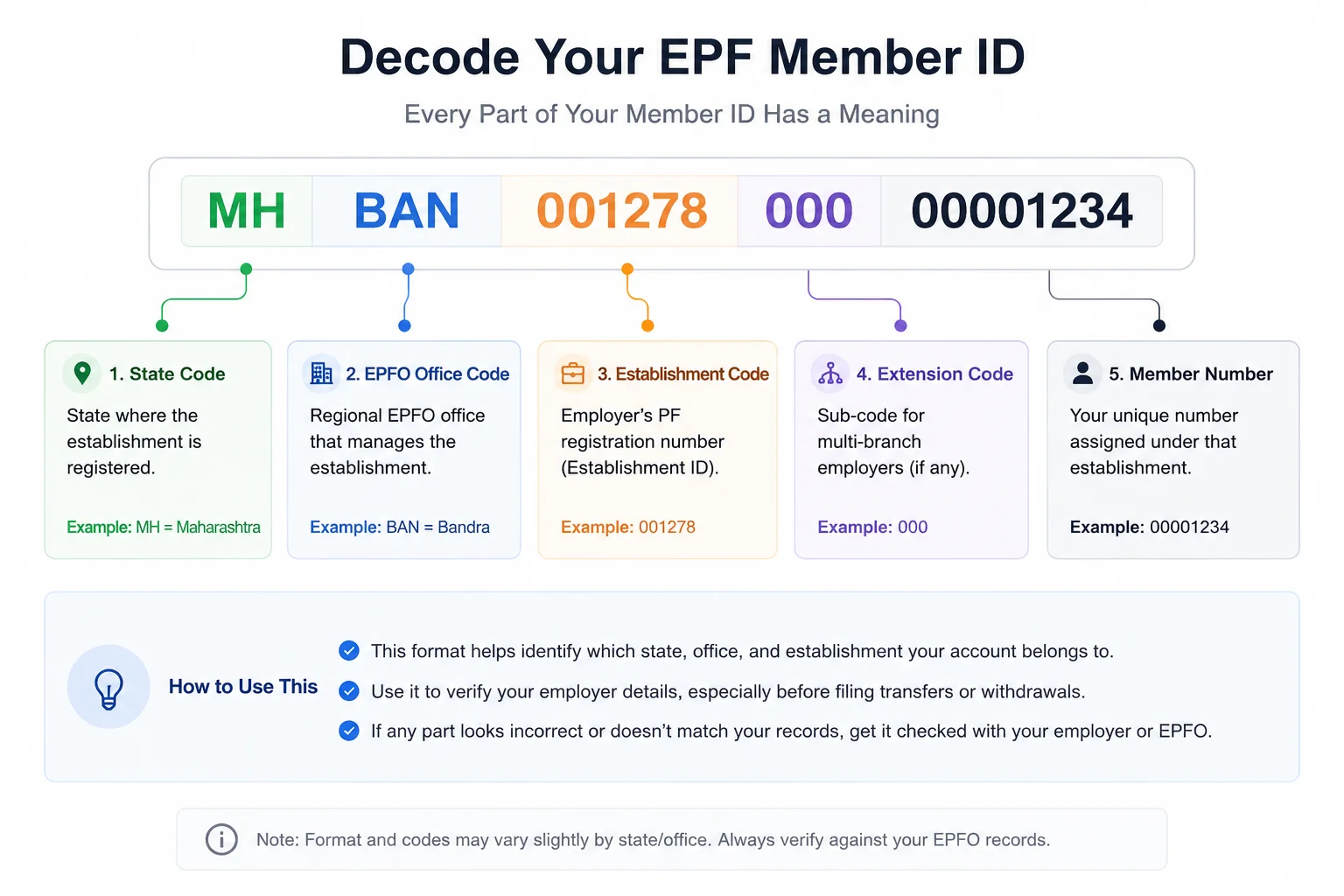
A Member ID encodes information about the employer and the EPFO office managing that account:
MHBAN00127800000001234
| Part | Meaning |
|---|---|
| State code | State where the establishment is registered |
| EPFO office code | Regional office handling that establishment |
| Establishment code | Employer's PF registration number |
| Extension | Sub-code for multi-branch employers, if any |
| Member number | Your employee-specific number under that employer |
This breakdown is illustrative. Exact codes vary by state and office — always confirm against your own EPFO records rather than relying on a generic example, especially before using it for a claim or legal purpose.
Decoding it is only useful if you know what to do with what you find:
| What you see | What it means |
|---|---|
| State code matches where your employer operates | Expected — no action needed |
| Office code you don't recognize | Verify it against your EPFO records before relying on it |
| Establishment code doesn't match your employer | Investigate before filing a transfer or withdrawal |
| Format looks broken or too short/long | Likely a typing or data-entry error — check the source |
Multiple Member IDs: Normal vs a Problem
| Situation | Normal? | What to do |
|---|---|---|
| Changed jobs | Yes | Transfer the previous balance if you haven't already |
| New employer uses a different PF establishment | Yes | Confirm the new Member ID shows under your UAN |
| Group company transfer, different PF code | Yes | Check Service History after the transfer completes |
| Duplicate Member ID for the same employment | No | Ask your employer to review EPFO records |
| Previous employment missing from UAN | No | Check transfer status and Service History |
| Two UANs created by mistake | No | Resolve the duplicate UAN before filing any claim |
| Member ID linked to the wrong employer | No | Raise it with your employer and EPFO directly |
Before You File Any EPF Claim: A 60-Second Check
Most EPF issues are only discovered after a claim has already been submitted — at which point fixing them takes weeks instead of minutes. Before filing a transfer or withdrawal, check these four things:
| Check | Why it matters |
|---|---|
| Every employer appears in Service History | A missing employment can break service continuity |
| Every Member ID is mapped to the correct employer | Prevents filing a claim against the wrong account |
| Date of Exit is updated for previous employers | A missing exit date is a common, avoidable cause of transfer delays |
| Aadhaar, PAN, and bank details are verified | KYC mismatches are one of the fastest ways to get a claim stuck |
If your Member ID isn't showing up at all, it's usually one of: a recent join that hasn't reflected yet, an employer onboarding delay, or an incorrect UAN linkage — give it a few days if you just joined, then check with HR or EPFO if it still doesn't appear. If you find a wrong or duplicate Member ID, don't file against it — get your employer to correct it through EPFO first.
Where Your Member ID Shows Up
| Service | Why it matters |
|---|---|
| PF Transfer | Identifies source and destination accounts |
| PF Withdrawal | Specifies which balance is being claimed |
| EPF Passbook | Shows contributions for that employment |
| Service History | Records your employment timeline |
| Employee Pension Scheme (EPS) | Used to calculate eligible service |
| EDLI benefits | Maps your employment to the right establishment |
If a Member ID is missing or wrongly linked, any of these can show an inaccurate picture of your EPF record.
FAQs
Is a Member ID the same as a UAN? No, UAN identifies you for life; Member ID identifies one specific employment.
Can I have multiple Member IDs? Yes — normal if you've worked for more than one EPF-covered employer, as long as they're all linked to one UAN.
Does my Member ID change after switching jobs? Usually. Your new employer typically creates a fresh one while your UAN stays the same.
Can I withdraw PF using an old Member ID? Claims run against your records under your UAN. If a balance hasn't been transferred or Service History is incomplete, that needs resolving first.
Why isn't my previous employer showing under my UAN? Usually because the transfer was never completed, your previous employer hasn't updated your Date of Exit, or the two records simply haven't been linked yet. Check Service History first — if it's still missing, that's worth resolving with your previous employer or EPFO before you file anything.
How do I identify my employer from a Member ID? The establishment code section identifies their EPFO registration, Kustodian's decoder tool above can help interpret it.
Related guides: EPF Transfer Between Employers · EPF Passbook Guide · PF Balance Check EPF Withdrawal Process
-----
Most EPF problems surface only when a transfer, withdrawal, or pension claim is already in motion — by then, a missing Member ID or incomplete Service History costs you time you didn't budget for.
Run your free EPF Health Check — Kustodian reviews your records to confirm every Member ID is linked, flag missing employment history, and catch transfer gaps before you file.
PF Interest Loss Calculator
See how much interest you lose every month your claim sits unresolved.